c লেবেলটি সহ পোস্টগুলি দেখানো হচ্ছে৷ সকল পোস্ট দেখান

C Tokens, Keywords, Identifiers, Constants, Variables, Data Types

In this tutorial, you will learn
  • What is a Character set?
  • Token
  • Keywords and Identifiers
  • What is a Variable?
  • Integer data type
  • Floating point data type
  • Constants

What is a Character set?

Like every other language 'C' also has its own character set. A program is a set of instructions that when executed, generate an output. The data that is processed by a program consists of various characters and symbols. The output generated is also a combination of characters and symbols.
A character set in 'C' is divided into,
  • Letters
  • Numbers
  • Special characters
  • White spaces (blank spaces)
A compiler always ignores the use ofcharacters, but it is widely used for formatting the data. Following is the character set in 'C' programming:
  1. Letters
    • Uppercase characters (A-Z)
    • Lowercase characters (a-z)
  2. Numbers
    • All the digits from 0 to 9
  3. White spaces
    • Blank space
    • New line
    • Carriage return
    • Horizontal tab
  4. Special characters
    • Special characters in 'C' are shown in the given table,
, (comma) { (opening curly bracket)
. (period) } (closing curly bracket)
; (semi-colon) [ (left bracket)
: (colon) ] (right bracket)
? (question mark) ( (opening left parenthesis)
' (apostrophe) ) (closing right parenthesis)
" (double quotation mark) & (ampersand)
! (exclamation mark) ^ (caret)
|(vertical bar) + (addition)
/ (forward slash) - (subtraction)
\ (backward slash) * (multiplication)
~ (tilde) / (division)
_ (underscore) > (greater than or closing angle bracket)
$ (dollar sign) < (less than or opening angle bracket)
% (percentage sign) # (hash sign)

Token

A token is the smallest unit in a 'C' program. A token is divided into six different types as follows,


Tokens in C

Keywords and Identifiers

In 'C' every word can be either a keyword or an identifier.
Keywords have fixed meanings, and the meaning cannot be changed. They act as a building block of a 'C' program. There are total 32 keywords in 'C'. Keywords are written in lowercase letters.
Following table represents the keywords in 'C',
auto double int struct
break else long switch
case enum register typedef
char extern return union
const short float unsigned
continue for signed void
default goto sizeof volatile
do if static while
An identifier is nothing but a name assigned to an element in a program. Example, name of a variable, function, etc. Identifiers are the user-defined names consisting of 'C' standard character set. As the name says, identifiers are used to identify a particular element in a program. Each identifier must have a unique name. Following rules must be followed for identifiers:
  1. The first character must always be an alphabet or an underscore.
  2. It should be formed using only letters, numbers, or underscore.
  3. A keyword cannot be used as an identifier.
  4. It should not contain any whitespace character.
  5. The name must be meaningful.

What is a Variable?

A variable is an identifier which is used to store some value. Constants can never change at the time of execution. Variables can change during the execution of a program and update the value stored inside it.
A single variable can be used at multiple locations in a program. A variable name must be meaningful. It should represent the purpose of the variable.
Example: Height, age, are the meaningful variables that represent the purpose it is being used for. Height variable can be used to store a height value. Age variable can be used to store the age of a person
A variable must be declared first before it is used somewhere inside the program. A variable name is formed using characters, digits and an underscore.
Following are the rules that must be followed while creating a variable:
  1. A variable name should consist of only characters, digits and an underscore.
  2. A variable name should not begin with a number.
  3. A variable name should not consist of whitespace.
  4. A variable name should not consist of a keyword.
  5. 'C' is a case sensitive language that means a variable named 'age' and 'AGE' are different.
Following are the examples of valid variable names in a 'C' program:
height or HEIGHT
_height
_height1
My_name
Following are the examples of invalid variable names in a 'C' program:
1height
Hei$ght
My name
For example, we declare an integer variable my_variable and assign it the value 48:
int my_variable;
my_variable = 48;
By the way, we can both declare and initialize (assign an initial value) a variable in a single statement:
int my_variable = 48;

Data types

'C' provides various data types to make it easy for a programmer to select a suitable data type as per the requirements of an application. Following are the three data types:
  1. Primitive data types
  2. Derived data types
  3. User-defined data types
There are five primary fundamental data types,
  1. int for integer data
  2. char for character data
  3. float for floating point numbers
  4. double for double precision floating point numbers
  5. void
Array, functions, pointers, structures are derived data types. 'C' language provides more extended versions of the above mentioned primary data types. Each data type differs from one another in size and range. Following table displays the size and range of each data type.
Data type Size in bytes Range
Char or signed char 1 -128 to 127
Unsigned char 1 0 to 255
int or signed int 2 -32768 to 32767
Unsigned int 2 0 to 65535
Short int or Unsigned short int 2 0 to 255
Signed short int 2 -128 to 127
Long int or Signed long int 4 -2147483648 to 2147483647
Unsigned long int 4 0 to 4294967295
float 4 3.4E-38 to 3.4E+38
double 8 1.7E-308 to 1.7E+308
Long double 10 3.4E-4932 to 1.1E+4932
Note: In C, there is no Boolean data type.

Integer data type

Integer is nothing but a whole number. The range for an integer data type varies from machine to machine. The standard range for an integer data type is -32768 to 32767.
An integer typically is of 2 bytes which means it consumes a total of 16 bits in memory. A single integer value takes 2 bytes of memory. An integer data type is further divided into other data types such as short int, int, and long int.
Each data type differs in range even though it belongs to the integer data type family. The size may not change for each data type of integer family.
The short int is mostly used for storing small numbers, int is used for storing averagely sized integer values, and long int is used for storing large integer values.
Whenever we want to use an integer data type, we have place int before the identifier such as,
int age;
Here, age is a variable of an integer data type which can be used to store integer values.

Floating point data type

Like integers, in 'C' program we can also make use of floating point data types. The 'float' keyword is used to represent the floating point data type. It can hold a floating point value which means a number is having a fraction and a decimal part. A floating point value is a real number that contains a decimal point. Integer data type doesn't store the decimal part hence we can use floats to store decimal part of a value.
Generally, a float can hold up to 6 precision values. If the float is not sufficient, then we can make use of other data types that can hold large floating point values. The data type double and long double are used to store real numbers with precision up to 14 and 80 bits respectively.
While using a floating point number a keyword float/double/long double must be placed before an identifier. The valid examples are,
float division;
double BankBalance;

Character data type

Character data types are used to store a single character value enclosed in single quotes.
A character data type takes up-to 1 byte of memory space.
Example,
Char letter;

Void data type

A void data type doesn't contain or return any value. It is mostly used for defining functions in 'C'.
Example,
void displayData()
Type declaration of a variable
int main() {
int x, y;
float salary = 13.48;
char letter = 'K';
x = 25;
y = 34;
int z = x+y;
printf("%d \n", z);
printf("%f \n", salary);
printf("%c \n", letter);
return 0;}
Output:
59
13.480000
K
We can declare multiple variables with the same data type on a single line by separating them with a comma. Also, notice the use of format specifiers in printf output function float (%f) and char (%c) and int (%d).

Constants

Constants are the fixed values that never change during the execution of a program. Following are the various types of constants:

Integer constants

An integer constant is nothing but a value consisting of digits or numbers. These values never change during the execution of a program. Integer constants can be octal, decimal and hexadecimal.
  1. Decimal constant contains digits from 0-9 such as,
Example, 111, 1234
Above are the valid decimal constants.
  1. Octal constant contains digits from 0-7, and these types of constants are always preceded by 0.
Example, 012, 065
Above are the valid decimal constants.
  1. Hexadecimal constant contains a digit from 0-9 as well as characters from A-F. Hexadecimal constants are always preceded by 0X.
Example, 0X2, 0Xbcd
Above are the valid hexadecimal constants.
The octal and hexadecimal integer constants are very rarely used in programming with 'C'.

Character constants

A character constant contains only a single character enclosed within a single quote (''). We can also represent character constant by providing ASCII value of it.
Example, 'A', '9'
Above are the examples of valid character constants.

String constants

A string constant contains a sequence of characters enclosed within double quotes ("").
Example, "Hello", "Programming"
These are the examples of valid string constants.

Real Constants

Like integer constants that always contains an integer value. 'C' also provides real constants that contain a decimal point or a fraction value. The real constants are also called as floating point constants. The real constant contains a decimal point and a fractional value.
Example, 202.15, 300.00
These are the valid real constants in 'C'.
A real constant can also be written as,
Mantissa e Exponent
For example, to declare a value that does not change like the classic circle constant PI, there are two ways to declare this constant
  1. By using the const keyword in a variable declaration which will reserve a storage memory
  2.  #include <stdio.h>
    int main() {
    const double PI = 3.14;
    printf("%f", PI);
    //PI++; // This will generate an error as constants cannot be changed
    return 0;}
    
  3. By using the #define pre-processor directive which doesn't use memory for storage and without putting a semicolon character at the end of that statement
  4. #include <stdio.h>
    #define PI 3.14
    int main() {
    printf("%f", PI);
    return 0;}
    
Summary
  • A constant is a value that doesn't change throughout the execution of a program.
  • A token is the smallest unit in a program.
  • A keyword is reserved words by language.
  • There are total 32 keywords.
  • An identifier is used to identify elements of a program.
  • A variable is an identifier which is used to store a value.
  • There are four commonly used data types such as int, float, char and a void.
  • Each data type differs in size and range from one another.

How to write Comments in C Programming

What Is Comment In C Language?

A comment is an explanation or description of the source code of the program. It helps a developer explain logic of the code and improves program readability. At run-time, a comment is ignored by the compiler.
There are two types of comments in C:
1) A comment that starts with a slash asterisk /* and finishes with an asterisk slash */ and you can place it anywhere in your code, on the same line or several lines.
2) Single-line Comments which uses a double slash // dedicated to comment single lines

Example Single Line Comment

// single line comment example
Here is an example of comments type
// C program to demo 
// Single Line comment 
#include <stdio.h> 
int main(void) 
{ 
  
 // This is a single line comment 
 printf("Guru99"); 
 return 0;  // return zero
}

Example Multi Line Comment

/* Sample Multiline Comment
Line 1
Line 2
….
…
*/
Example Multi Line Comment
#include <stdio.h>
int main() {
/* in main function
I can write my principal code
And this in several comments line */
int x = 42; //x is a integer variable
printf("%d", x);
return 0;} 

Why do you need comments?

A good programmer who writes codes understood by a human is better than a programmer who generates codes understood only by the machine.
So, it is highly recommended to insert comments to your code because it is good programming practice. Comments do not affect a program because the compiler ignores them.
Comments help the developer understand the logic/algorithm of the code if he revisits it after a long time.


History of C language

History of C language

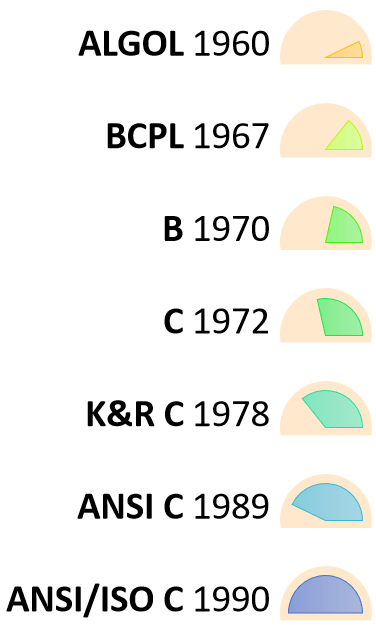
The base or father of programming languages is 'ALGOL.' It was first introduced in 1960. 'ALGOL' was used on a large basis in European countries. 'ALGOL' introduced the concept of structured programming to the developer community. In 1967, a new computer programming language was announced called as 'BCPL' which stands for Basic Combined Programming Language. BCPL was designed and developed by Martin Richards, especially for writing system software. This was the era of programming languages. Just after three years, in 1970 a new programming language called 'B' was introduced by Ken Thompson that contained multiple features of 'BCPL.' This programming language was created using UNIX operating system at AT&T and Bell Laboratories. Both the 'BCPL' and 'B' were system programming languages.
In 1972, a great computer scientist Dennis Ritchie created a new programming language called 'C' at the Bell Laboratories. It was created from 'ALGOL', 'BCPL' and 'B' programming languages. 'C' programming language contains all the features of these languages and many more additional concepts that make it unique from other languages.
'C' is a powerful programming language which is strongly associated with the UNIX operating system. Even most of the UNIX operating system is coded in 'C'. Initially 'C' programming was limited to the UNIX operating system, but as it started spreading around the world, it became commercial, and many compilers were released for cross-platform systems. Today 'C' runs under a variety of operating systems and hardware platforms. As it started evolving many different versions of the language were released. At times it became difficult for the developers to keep up with the latest version as the systems were running under the older versions. To assure that 'C' language will remain standard, American National Standards Institute (ANSI) defined a commercial standard for 'C' language in 1989. Later, it was approved by the International Standards Organization (ISO) in 1990. 'C' programming language is also called as 'ANSI C'.

History of C
Languages such as C++/Java are developed from 'C'. These languages are widely used in various technologies. Thus, 'C' forms a base for many other languages that are currently in use.

Where is C used? Key Applications

  1. 'C' language is widely used in embedded systems.
  2. It is used for developing system applications.
  3. It is widely used for developing desktop applications.
  4. Most of the applications by Adobe are developed using 'C' programming language.
  5. It is used for developing browsers and their extensions. Google's Chromium is built using 'C' programming language.
  6. It is used to develop databases. MySQL is the most popular database software which is built using 'C'.
  7. It is used in developing an operating system. Operating systems such as Apple's OS X, Microsoft's Windows, and Symbian are developed using 'C' language. It is used for developing desktop as well as mobile phone's operating system.
  8. It is used for compiler production.
  9. It is widely used in IOT applications.

Why learn 'C'?

As we studied earlier, 'C' is a base language for many programming languages. So, learning 'C' as the main language will play an important role while studying other programming languages. It shares the same concepts such as data types, operators, control statements and many more. 'C' can be used widely in various applications. It is a simple language and provides faster execution. There are many jobs available for a 'C' developer in the current market.
'C' is a structured programming language in which program is divided into various modules. Each module can be written separately and together it forms a single 'C' program. This structure makes it easy for testing, maintaining and debugging processes.
'C' contains 32 keywords, various data types and a set of powerful built-in functions that make programming very efficient.
Another feature of 'C' programming is that it can extend itself. A 'C' program contains various functions which are part of a library. We can add our features and functions to the library. We can access and use these functions anytime we want in our program. This feature makes it simple while working with complex programming.
Various compilers are available in the market that can be used for executing programs written in this language.
It is a highly portable language which means programs written in 'C' language can run on other machines. This feature is essential if we wish to use or execute the code on another computer.

How 'C' Works?

C is a compiled language. A compiler is a special tool that compiles the program and converts it into the object file which is machine readable. After the compilation process, the linker will combine different object files and creates a single executable file to run the program. The following diagram shows the execution of a 'C' program
Nowadays, various compilers are available online, and you can use any of those compilers. The functionality will never differ and most of the compilers will provide the features required to execute both 'C' and 'C++' programs.
Following is the list of popular compilers available online:
  • Clang compiler
  • MinGW compiler (Minimalist GNU for Windows)
  • Portable 'C' compiler
  • Turbo C

Summary

  • 'C' was developed by Dennis Ritchie in 1972.
  • It is a robust language.
  • It is a low programming level language close to machine language
  • It is widely used in the software development field.
  • It is a procedure and structure oriented language.
  • It has the full support of various operating systems and hardware platforms.
  • Many compilers are available for executing programs written in 'C'.
  • A compiler compiles the source file and generates an object file.
  • A linker links all the object files together and creates one executable file.
  • It is highly portable.

Loops in C

How to use Loops in C

In any programming language including C, loops are used to execute a set of statements repeatedly until a particular condition is satisfied.

How it Works

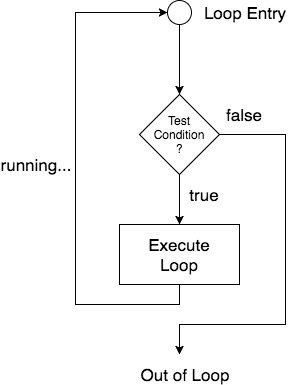
The below diagram depicts a loop execution,
loopflow diagram in C
As per the above diagram, if the Test Condition is true, then the loop is executed, and if it is false then the execution breaks out of the loop. After the loop is successfully executed the execution again starts from the Loop entry and again checks for the Test condition, and this keeps on repeating.
The sequence of statements to be executed is kept inside the curly braces { } known as the Loop body. After every execution of the loop body, condition is verified, and if it is found to be true the loop body is executed again. When the condition check returns false, the loop body is not executed, and execution breaks out of the loop.

Types of Loop

There are 3 types of Loop in C language, namely:
  1. while loop
  2. for loop
  3. do while loop

while loop

while loop can be addressed as an entry control loop. It is completed in 3 steps.
  • Variable initialization.(e.g int x = 0;)
  • condition(e.g while(x <= 10))
  • Variable increment or decrement ( x++ or x-- or x = x + 2 )
Syntax :
variable initialization;
while(condition)
{
    statements;
    variable increment or decrement; 
}

Example: Program to print first 10 natural numbers

#include<stdio.h>

void main( )
{
    int x;
    x = 1;
    while(x <= 10)
    {
        printf("%d\t", x);
        /* below statement means, do x = x+1, increment x by 1*/
        x++;
    }
}
1 2 3 4 5 6 7 8 9 10

for loop

for loop is used to execute a set of statements repeatedly until a particular condition is satisfied. We can say it is an open ended loop.. General format is,
for(initialization; condition; increment/decrement)
{
    statement-block;
}
In for loop we have exactly two semicolons, one after initialization and second after the condition. In this loop we can have more than one initialization or increment/decrement, separated using comma operator. But it can have only one condition.
The for loop is executed as follows:
  1. It first evaluates the initialization code.
  2. Then it checks the condition expression.
  3. If it is true, it executes the for-loop body.
  4. Then it evaluate the increment/decrement condition and again follows from step 2.
  5. When the condition expression becomes false, it exits the loop.

Example: Program to print first 10 natural numbers

#include<stdio.h>

void main( )
{
    int x;
    for(x = 1; x <= 10; x++)
    {
        printf("%d\t", x);
    }
}
1 2 3 4 5 6 7 8 9 10

Nested for loop

We can also have nested for loops, i.e one for loop inside another for loop. Basic syntax is,
for(initialization; condition; increment/decrement)
{
    for(initialization; condition; increment/decrement)
    {
        statement ;
    }
}

Example: Program to print half Pyramid of numbers

#include<stdio.h>

void main( )
{
    int i, j;
    /* first for loop */
    for(i = 1; i < 5; i++)
    {
        printf("\n");
        /* second for loop inside the first */
        for(j = i; j > 0; j--)
        {
            printf("%d", j);
        }
    }
}
1 21 321 4321 54321

do while loop

In some situations it is necessary to execute body of the loop before testing the condition. Such situations can be handled with the help of do-while loop. do statement evaluates the body of the loop first and at the end, the condition is checked using while statement. It means that the body of the loop will be executed at least once, even though the starting condition inside while is initialized to be false. General syntax is,
do
{
    .....
    .....
}
while(condition)

Example: Program to print first 10 multiples of 5.

#include<stdio.h>

void main()
{
    int a, i;
    a = 5;
    i = 1;
    do
    {
        printf("%d\t", a*i);
        i++;
    } 
    while(i <= 10);
}
5 10 15 20 25 30 35 40 45 50

Jumping Out of Loops

Sometimes, while executing a loop, it becomes necessary to skip a part of the loop or to leave the loop as soon as certain condition becomes true. This is known as jumping out of loop.

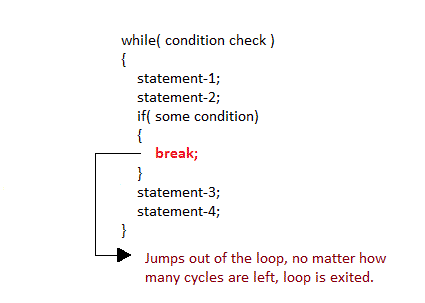
1) break statement

When break statement is encountered inside a loop, the loop is immediately exited and the program continues with the statement immediately following the loop.
break statement in loops in c language

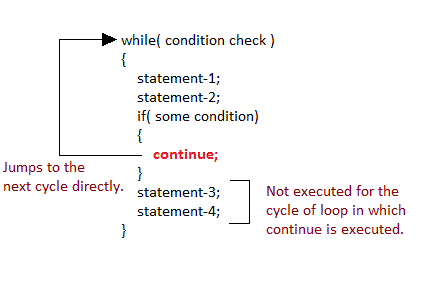
2) continue statement

It causes the control to go directly to the test-condition and then continue the loop process. On encountering continue, cursor leave the current cycle of loop, and starts with the next cycle.
continue statement in loops in c language

Operator in C Programming Language

An operator is a symbol which operates on a value or a variable. For example: + is an operator to perform addition.
C has wide range of operators to perform various operations.

C Arithmetic Operators

An arithmetic operator performs mathematical operations such as addition, subtraction and multiplication on numerical values (constants and variables).
Operator Meaning of Operator
+ addition or unary plus
- subtraction or unary minus
* multiplication
/ division
% remainder after division( modulo division)

Example 1: Arithmetic Operators

// C Program to demonstrate the working of arithmetic operators
#include <stdio.h>
int main()
{
    int a = 9,b = 4, c;
    
    c = a+b;
    printf("a+b = %d \n",c);

    c = a-b;
    printf("a-b = %d \n",c);
    
    c = a*b;
    printf("a*b = %d \n",c);
    
    c=a/b;
    printf("a/b = %d \n",c);
    
    c=a%b;
    printf("Remainder when a divided by b = %d \n",c);
    
    return 0;
}
Output
a+b = 13
a-b = 5
a*b = 36
a/b = 2
Remainder when a divided by b=1
The operators +, - and * computes addition, subtraction and multiplication respectively as you might have expected.
In normal calculation, 9/4 = 2.25. However, the output is 2 in the program.
It is because both variables a and b are integers. Hence, the output is also an integer. The compiler neglects the term after decimal point and shows answer 2 instead of 2.25.
The modulo operator % computes the remainder. When a = 9 is divided by b = 4, the remainder is 1. The % operator can only be used with integers.
Suppose a = 5.0, b = 2.0, c = 5 and d = 2. Then in C programming,

a/b = 2.5  // Because both operands are floating-point variables
a/d = 2.5  // Because one operand is floating-point variable
c/b = 2.5  // Because one operand is floating-point variable
c/d = 2     // Because both operands are integers

Increment and decrement operators

C programming has two operators increment ++ and decrement -- to change the value of an operand (constant or variable) by 1.
Increment ++ increases the value by 1 whereas decrement -- decreases the value by 1. These two operators are unary operators, meaning they only operate on a single operand.

Example 2: Increment and Decrement Operators

// C Program to demonstrate the working of increment and decrement operators
#include <stdio.h>
int main()
{
    int a = 10, b = 100;
    float c = 10.5, d = 100.5;

    printf("++a = %d \n", ++a);

    printf("--b = %d \n", --b);

    printf("++c = %f \n", ++c);

    printf("--d = %f \n", --d);

    return 0;
}
Output
++a = 11
--b = 99
++c = 11.500000
++d = 99.500000
Here, the operators ++ and -- are used as prefix. These two operators can also be used as postfix like a++ and a--. Visit this page to learn more on how increment and decrement operators work when used as postfix.

C Assignment Operators

An assignment operator is used for assigning a value to a variable. The most common assignment operator is =
Operator Example Same as
= a = b a = b
+= a += b a = a+b
-= a -= b a = a-b
*= a *= b a = a*b
/= a /= b a = a/b
%= a %= b a = a%b

Example 3: Assignment Operators

// C Program to demonstrate the working of assignment operators
#include <stdio.h>
int main()
{
    int a = 5, c;

    c = a;
    printf("c = %d \n", c);

    c += a; // c = c+a
    printf("c = %d \n", c);

    c -= a; // c = c-a
    printf("c = %d \n", c);

    c *= a; // c = c*a
    printf("c = %d \n", c);

    c /= a; // c = c/a
    printf("c = %d \n", c);

    c %= a; // c = c%a
    printf("c = %d \n", c);

    return 0;
}
Output
c = 5 
c = 10 
c = 5 
c = 25 
c = 5 
c = 0

C Relational Operators

A relational operator checks the relationship between two operands. If the relation is true, it returns 1; if the relation is false, it returns value 0.
Relational operators are used in decision making and loops.
Operator Meaning of Operator Example
== Equal to 5 == 3 returns 0
> Greater than 5 > 3 returns 1
< Less than 5 < 3 returns 0
!= Not equal to 5 != 3 returns 1
>= Greater than or equal to 5 >= 3 returns 1
<= Less than or equal to 5 <= 3 return 0

Example 4: Relational Operators

// C Program to demonstrate the working of arithmetic operators
#include <stdio.h>
int main()
{
    int a = 5, b = 5, c = 10;

    printf("%d == %d = %d \n", a, b, a == b); // true
    printf("%d == %d = %d \n", a, c, a == c); // false

    printf("%d > %d = %d \n", a, b, a > b); //false
    printf("%d > %d = %d \n", a, c, a > c); //false


    printf("%d < %d = %d \n", a, b, a < b); //false
    printf("%d < %d = %d \n", a, c, a < c); //true


    printf("%d != %d = %d \n", a, b, a != b); //false
    printf("%d != %d = %d \n", a, c, a != c); //true


    printf("%d >= %d = %d \n", a, b, a >= b); //true
    printf("%d >= %d = %d \n", a, c, a >= c); //false


    printf("%d <= %d = %d \n", a, b, a <= b); //true
    printf("%d <= %d = %d \n", a, c, a <= c); //true

    return 0;

}
Output
5 == 5 = 1
5 == 10 = 0
5 > 5 = 0
5 > 10 = 0
5 < 5 = 0
5 < 10 = 1
5 != 5 = 0
5 != 10 = 1
5 >= 5 = 1
5 >= 10 = 0
5 <= 5 = 1
5 <= 10 = 1 

C Logical Operators

An expression containing logical operator returns either 0 or 1 depending upon whether expression results true or false. Logical operators are commonly used in decision making in C programming.
Operator Meaning of Operator Example
&& Logial AND. True only if all operands are true  If c = 5 and d = 2 then, expression ((c == 5) && (d > 5)) equals to 0.
|| Logical OR. True only if either one operand is true If c = 5 and d = 2 then, expression ((c == 5) || (d > 5)) equals to 1.
! Logical NOT. True only if the operand is 0 If c = 5 then, expression ! (c == 5) equals to 0.

Example #5: Logical Operators

// C Program to demonstrate the working of logical operators

#include <stdio.h>
int main()
{
    int a = 5, b = 5, c = 10, result;

    result = (a == b) && (c > b);
    printf("(a == b) && (c > b) equals to %d \n", result);

    result = (a == b) && (c < b);
    printf("(a == b) && (c < b) equals to %d \n", result);

    result = (a == b) || (c < b);
    printf("(a == b) || (c < b) equals to %d \n", result);

    result = (a != b) || (c < b);
    printf("(a != b) || (c < b) equals to %d \n", result);

    result = !(a != b);
    printf("!(a == b) equals to %d \n", result);

    result = !(a == b);
    printf("!(a == b) equals to %d \n", result);

    return 0;
}
Output
(a == b) && (c > b) equals to 1 
(a == b) && (c < b) equals to 0 
(a == b) || (c < b) equals to 1 
(a != b) || (c < b) equals to 0 
!(a != b) equals to 1 
!(a == b) equals to 0 
Explanation of logical operator program
  • (a == b) && (c > 5) evaluates to 1 because both operands (a == b) and (c > b) is 1 (true).
  • (a == b) && (c < b) evaluates to 0 because operand (c < b) is 0 (false).
  • (a == b) || (c < b) evaluates to 1 because (a = b) is 1 (true).
  • (a != b) || (c < b) evaluates to 0 because both operand (a != b) and (c < b) are 0 (false).
  • !(a != b) evaluates to 1 because operand (a != b) is 0 (false). Hence, !(a != b) is 1 (true).
  • !(a == b) evaluates to 0 because (a == b) is 1 (true). Hence, !(a == b) is 0 (false).

Bitwise Operators

During computation, mathematical operations like: addition, subtraction, addition and division are converted to bit-level which makes processing faster and saves power.
Bitwise operators are used in C programming to perform bit-level operations.
Operators Meaning of operators
& Bitwise AND
| Bitwise OR
^ Bitwise exclusive OR
~ Bitwise complement
<< Shift left
>> Shift right
Visit bitwise operator in C to learn more.

Other Operators


Comma Operator

Comma operators are used to link related expressions together. For example:
int a, c = 5, d;

The sizeof operator

The sizeof is an unary operator which returns the size of data (constant, variables, array, structure etc).

Example 6: sizeof Operator

#include <stdio.h>
int main()
{
    int a, e[10];
    float b;
    double c;
    char d;
    printf("Size of int=%lu bytes\n",sizeof(a));
    printf("Size of float=%lu bytes\n",sizeof(b));
    printf("Size of double=%lu bytes\n",sizeof(c));
    printf("Size of char=%lu byte\n",sizeof(d));
    printf("Size of integer type array having 10 elements = %lu bytes\n", sizeof(e));
    return 0;
}
Output
Size of int = 4 bytes
Size of float = 4 bytes
Size of double = 8 bytes
Size of char = 1 byte
Size of integer type array having 10 elements = 40 bytes

 C Ternary Operator (?:)

Ternary operator is a conditional operator that works on 3 operands.

Conditional Operator Syntax

conditionalExpression ? expression1 : expression2
The conditional operator works as follows:
  • The first expression conditionalExpression is evaluated first. This expression evaluates to 1 if it's true and evaluates to 0 if it's false.
  • If conditionalExpression is true, expression1 is evaluated.
  • If conditionalExpression is false, expression2 is evaluated.

Example 7: C conditional Operator

#include <stdio.h>
int main(){
   char February;
   int days;
   printf("If this year is leap year, enter 1. If not enter any integer: ");
   scanf("%c",&February);

   // If test condition (February == 'l') is true, days equal to 29.
   // If test condition (February =='l') is false, days equal to 28. 
   days = (February == '1') ? 29 : 28;

   printf("Number of days in February = %d",days);
   return 0;
}
Output
If this year is leap year, enter 1. If not enter any integer: 1
Number of days in February = 29