oracle database লেবেলটি সহ পোস্টগুলি দেখানো হচ্ছে৷ সকল পোস্ট দেখান

💠 Database Management System Concept

Module 2: Entity–Relationship (ER) Model

ER Diagrams and EER Concepts –
Keys: 
SQL Exercise
Exercise : Schema and Cardinalities

Module 3: Relational Model & Relational Algebra

SQL Exercise
SQL Exercise

Module 4: Structured Query Language (SQL)

Integrity Constraints

  • NOT NULL
  • UNIQUE
  • CHECK
  • PRIMARY KEY
  • FOREIGN KEY
SQL Exercise 

Joins

  • INNER JOIN
  • LEFT OUTER JOIN
  • RIGHT OUTER JOIN
  • FULL OUTER JOIN
  • CROSS JOIN

Advanced SQL Concepts

  • Subqueries
  • Views

Aggregate Functions

  • COUNT
  • SUM
  • AVG
  • MIN
  • MAX

Data Grouping and Filtering

  • GROUP BY
  • HAVING

Sorting Results

  • ORDER BY

Module 5: Normalization and Database Design

  • Functional Dependencies
  • 1NF, 2NF, 3NF, BCNF, 4NF, 5NF
  • Decomposition – Lossless Join and Dependency Preservation
  • Denormalization – Concepts and Trade-offs

Module 6: Transaction Management & Concurrency Control

  • Concept and Properties of Transactions (ACID)
  • Transaction States and Schedules
  • Serializability – Conflict and View
  • Lock-based and Timestamp-based Concurrency Control
  • Deadlock Handling

Module 7: Recovery System

  • Failure Types – Transaction, System, Media
  • Recovery Techniques – Deferred and Immediate Updates
  • Checkpoint, Shadow Paging, Log-based Recovery

Module 8: File Organization & Indexing

  • Sequential, Indexed, and Hashed File Organization
  • Indexing – Primary, Secondary, Dense, Sparse
  • B-Tree, B+ Tree, and Hash-based Indexing

Module 9: Database Security

  • Database Security Issues – Authentication, Authorization
  • Access Control – DAC, MAC, RBAC
  • Encryption and Data Privacy

Module 10: Advanced Topics

  • Distributed Databases and Data Warehousing
  • Data Mining and OLAP Concepts
  • NoSQL and Cloud Databases
  • Object-relational Databases

DBMS Lab Syllabus

  • Using MySQL / Oracle / PostgreSQL
  • Creating Databases, Tables, and Schemas
  • Insert, Update, Delete, and Retrieve Data
  • Join, Subquery, Aggregate Function Implementation
  • Views, Index, Trigger, and Stored Procedure Creation
  • Transaction Control – COMMIT, ROLLBACK
  • Normalization and Mini Project Implementation

Recommended Books

  • Silberschatz, Korth & Sudarshan – Database System Concepts
  • Raghu Ramakrishnan & Gehrke – Database Management Systems
  • Elmasri & Navathe – Fundamentals of Database Systems
  • Groff & Weinberg – SQL: The Complete Reference
dbms syllabus for cse students, database management system course outline, relational model, sql syllabus, normalization, transaction management, database lab syllabus, buet du iit dbms topics

Introduction to the `INSERT` Command

Certainly! Below is  a training module that focuses on the Oracle SQL `INSERT` command, specifically tailored for entering values into a `Customers` table. 

sql insert statement

Thank you for joining this training session today. We're going to dive into one of the fundamental concepts of SQL—specifically, the `INSERT` command. This command is essential for adding new records to our database tables, and today we will focus on how to use it effectively with a `Customers` table.

The `INSERT` command in Oracle SQL allows you to add new rows of data to a specified table. In our case, we’ll be inserting customer records into the `Customers` table. This table typically contains essential information about our customers, such as `Customer_ID`, `First_Name`, `Last_Name`, `Email`, and `Created_at`.

Basic Syntax

The basic syntax for the `INSERT` command is as follows:

```sql

INSERT INTO table_name (column1, column2, column3, ...)

VALUES (value1, value2, value3, ...);

```
Inserting Data into the Customer Table


Let’s consider our `Customer` table has the following structure:

- **Customer_ID**: Integer (Primary Key)

- **First_Name**: Varchar (Not Null)

- **Last_Name**: Varchar (Not Null)

- **Email**: Varchar (Unique)

- **Created_at**: Date (Default)

Now, to insert a new customer record, we would write an SQL command as follows:

```sql

INSERT INTO Customers (Customer_ID, First_Name, Last_Name, Email, created_at)

VALUES (1, 'Mr', 'Rahim', 'mr@tc.com', '01-jan-24');

```
Inserting Multiple Records

You may often need to input multiple records at once. Oracle SQL allows this by extending the `INSERT` statement like so:

```sql

INSERT INTO Customers(Customer_ID, First_Name, Last_Name, Email, created_at)

VALUES

(2, 'Md', 'Karim', 'mk@tc.com', '01-feb-24'),

(3, 'Mis', 'Lucky', 'ml@tc.com', '01-mar-23');

```
Important Considerations

1. **Primary Key Constraint**: Remember that if `Customer_ID` is a primary key, each value must be unique. Attempting to insert a duplicate value will result in an error.

2. **Data Types**: Ensure the values you provide match the data types defined in the table schema. For example, an integer is expected for numeric fields.

3. **NULL Values**: If your table allows NULL values for certain columns, you can choose to omit them from your `INSERT` statement, like so:

```sql

INSERT INTO Customers (Customer_ID, First_Name, Last_Name)

VALUES (4, 'Mis', 'Berly');

```
4. **Using Default Values**: If any column has a default value defined, it will automatically be used if you do not specify a value for that column during the insert.


Conclusion

The `INSERT` command is a powerful tool for populating your database. By understanding how to use it effectively, you'll be able to maintain and manage your customer records efficiently.

Remember, practice is key! I encourage you to try inserting records into your `Customers` table and explore different scenarios like bulk inserts or handling errors.

If you have any questions or need further clarification on any point, please feel free to ask. Happy querying!

What is C Programming Language?

What is C programming?

C is a general-purpose programming language that is extremely popular, simple and flexible. It is machine-independent, structured programming language which is used extensively in various applications.
C was the basics language to write everything from operating systems (Windows and many others) to complex programs like the Oracle database, Git, Python interpreter and more.
It is said that 'C' is a god's programming language. One can say, C is a base for the programming. If you know 'C,' you can easily grasp the knowledge of the other programming languages that uses the concept of 'C'
It is essential to have a background in computer memory mechanisms because it is an important aspect when dealing with the C programming language.

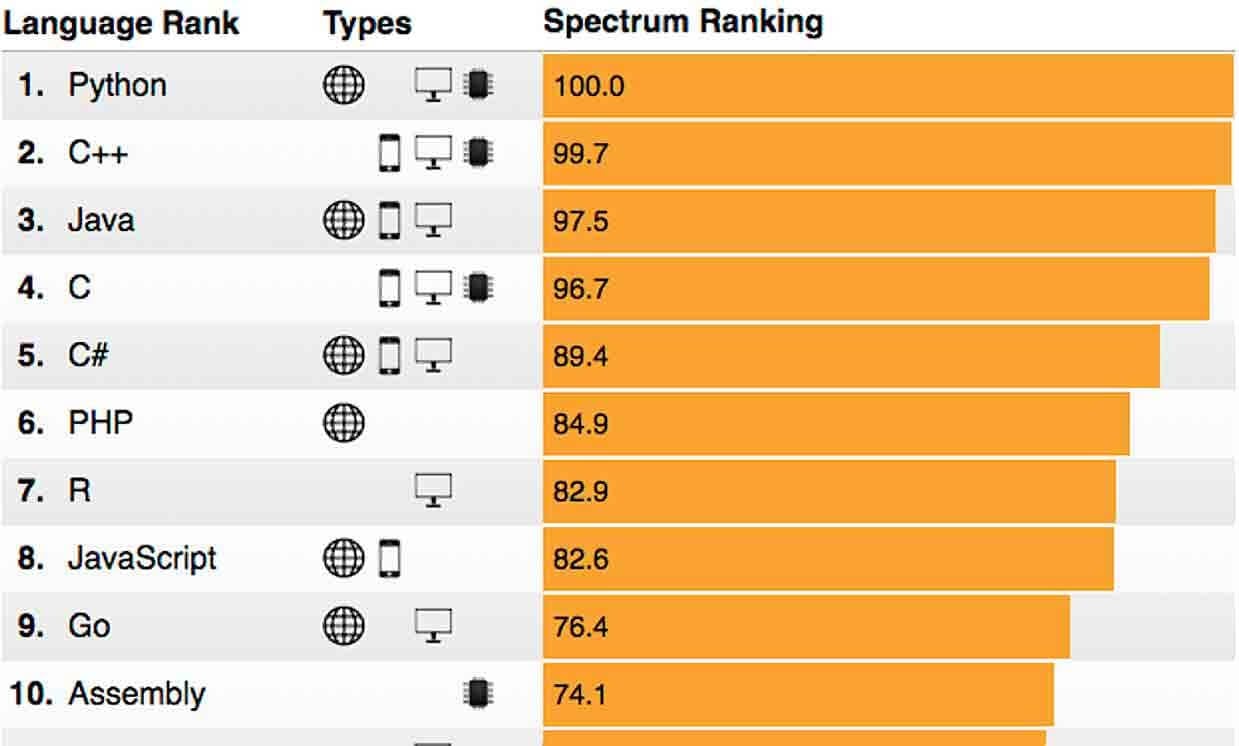
IEEE-the best 10 top programming language in 2018